The WFH Spine: Modern Ergonomics for the Hybrid Office Era
Discover 2026 ergonomic strategies for hybrid setups to eliminate back and neck pain.
Reviewed by a licensed advisor

August marks a major shift in the corporate calendar. As the summer holiday season winds down, millions of professionals are transitioning back to regular routines. However, in 2026, the office is no longer a single destination. The hybrid work model splitting time between corporate headquarters, home setups, and third spaces has become the global standard.
While this flexibility has transformed work-life balance, it has also introduced a pervasive musculoskeletal crisis: the "WFH Spine." Shifting between mismatched tables, non adjustable chairs, and laptop screens has caused a sharp rise in repetitive strain injuries and chronic back pain.
1. The Biomechanics of the Hybrid Slouch
The human spine is inherently designed for movement, balanced naturally in an "S" curve. When we sit at an unoptimized workstation, we inevitably default to a forward-leaning, slouched posture. This seemingly minor shift causes significant physiological strain.
When your head drifts forward by just 2.5 centimeters, the effective weight managed by your neck muscles and cervical spine increases by nearly 5 kilograms. Over an eight-hour workday, this forward head posture often called "Tech Neck" strains the trapezius and levator scapulae muscles. Simultaneously, it compresses the anterior spinal discs, frequently leading to premature degenerative changes and chronic tension headaches.
In corporate hubs characterized by small living spaces, professionals frequently work from dining chairs or sofas. These surfaces lack lumbar support, forcing the pelvis to tilt backward. This flattens the natural lumbar curve and loads the lower spinal discs far beyond their intended capacity.
2. Setting Up an Ergonomic Ecosystem
An effective ergonomic setup does not require transforming your home into a clinical laboratory. Instead, it relies on maintaining specific physical angles that minimize muscle strain.
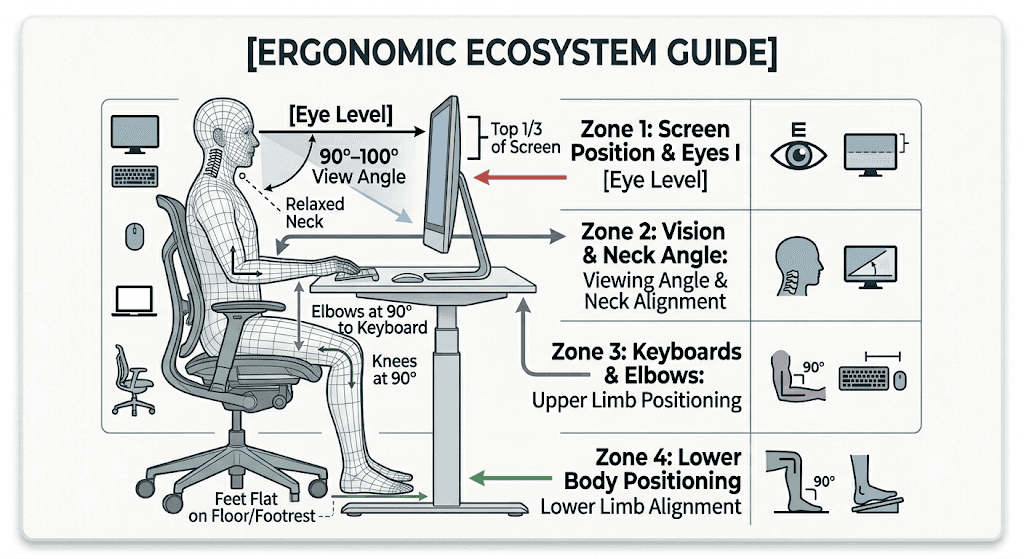
The 90-Degree Rule: Your elbows, hips, and knees should ideally maintain a 90-to-100-degree angle. Your feet must rest flat on the floor; if your chair must be raised to match a fixed table, use a footrest to avoid putting pressure on your thighs.
Decouple Your Screen and Keyboard: Laptops are inherently unergonomic because the keyboard and screen are joined. If the keyboard is at the right height for your arms, the screen is too low, straining your neck. Use a dedicated laptop riser or external monitor to align the top third of your screen with your eye level, and pair it with an external keyboard and mouse.
The Armrest Alignment: Adjust your armrests so your shoulders remain relaxed and your forearms sit parallel to the floor. If your armrests are too high, they shrug your shoulders, building severe tension across your neck and upper back.
3. The 2026 Movement Protocol: Defeating Static Load
Even the most expensive ergonomic chair cannot offset the strain of sitting still for hours. Static muscle loading restricts local blood circulation, accelerating muscle fatigue and stiffness.
Global health organizations recommend adopting the 20-20-20 rule along with active micro-breaks:
The Visual and Postural Reset: Every 20 minutes, look at an object 20 feet (6 meters) away for at least 20 seconds to relax your eyes. At the same time, roll your shoulders back and tuck your chin downward to reset your cervical alignment.
The 50-Minute Switch: Set a timer for 50 minutes of focused work. When it rings, stand up and move for 5 to 10 minutes. Walk around, perform a light chest stretch across a doorway, or do a few standing calf raises to restart your circulation.
4. Seeking Specialized Care
When persistent lower back pain or radiating tingling down your arm disrupts your daily focus, simple stretching exercises are no longer enough. Early clinical diagnosis can prevent minor nerve compressions from turning into permanent injuries.
Comprehensive medical networks provide access to advanced physiotherapy, osteopathy, and targeted core-stabilization therapies. For severe cases, seeing a specialist for digital spinal mapping or an MRI can pinpoint hidden disc issues, helping you map out a clear recovery plan.
Sources:
Harvard Health: Becoming a "Vigorously Active" Professional - New Desk Protocols
The Lancet: Global Musculoskeletal Health Burden & Work Environment Risks
AleaTip: Chronic back issues and repetitive strain injuries often require long-term, specialized physiotherapy care. Many basic insurance plans have specific terms and conditions for physiotherapy treatment. Please talk to your Alea advisor today to run a coverage audit, ensuring your plan provides comprehensive benefits.

Written by
Julien Mathieu
Co-Founder & CEO | Official CFE Representative


Need some help?
We’re here to provide support and assistance.